
SEO Basics for a Small Business Site: Start With Clear Pages
Start SEO with clear page purposes, descriptive titles, useful links, mobile reading checks, and public access. Keep traffic connected to the business goal.
Search engine optimization helps people and search engines understand what a page offers. For a new business site, start with accurate content, clear page titles, sensible navigation, and working links. Those foundations are more useful than chasing a keyword percentage or buying a promise of first-place rankings before your offer is clear.
Search is one way customers may find you. Keep other customer channels in the plan while you build a useful site and learn how people reach it.
Give each page one clear job
Decide what the visitor needs from the page. A service page explains an offer; a tutorial helps complete a task; a comparison supports a choice. If a page tries to perform all three jobs without a clear order, the main answer can become difficult to find. Write the reader's question at the top of your planning notes and keep the explanation focused on answering it.
Use the terms customers understand. An internal service name may need a plain-language explanation before it helps someone searching for the task.
For a hypothetical service that repairs spreadsheet formatting, describe the type of sheet, the problems handled, and the deliverable. Phrases such as "spreadsheet formatting help" may make more sense to a buyer than a broad label like "digital transformation." Choose wording from real conversations rather than inventing a search demand you have not checked.
Write titles that identify the difference
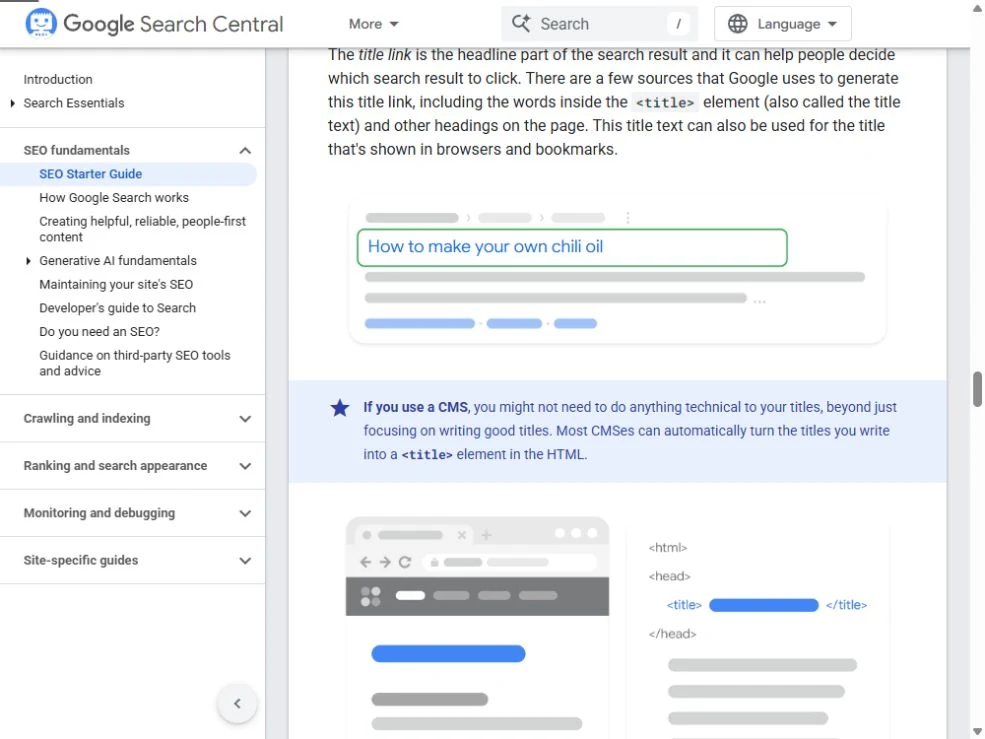
Make a title distinguish the page from others on the site. "Services" may be useful in navigation, but the page's title can identify the actual service. An article title should name the question or task, such as "Prepare a Spreadsheet for a Cleanup Project." Avoid putting the same long slogan at the beginning of every title, where it obscures the useful distinction.
Check whether the title makes sense outside the website. Someone seeing a search result has less context than a returning visitor.
Write a short, accurate description of the page for its metadata when your publishing system provides that control. Treat it as an explanation, not a place to repeat every keyword. Search engines can present different snippets, so a carefully written description is not a guarantee of the exact text every searcher will see.
Connect related resources where they help
Link an explanation to the next useful resource at the point where the reader needs it. A service page could link a preparation checklist; a business-model overview could link a detailed comparison. Tell the reader what the destination contains. A meaningful link such as "project preparation checklist" provides more guidance than "click here" or an unexplained raw address.
Build a simple navigation structure that supports these relationships. Avoid leaving a useful page accessible only through a link you forgot to add.
Review links periodically. Remove or replace broken destinations and update references when you change an offer. Keep URLs stable where practical, and arrange appropriate redirects when a live page moves. A renamed page should not quietly strand visitors who saved or shared its earlier address.
Make the content useful on a small screen
Preview the page on a phone-sized display and check its actual reading experience. Can someone identify the answer, navigate the headings, and operate important controls? Are tables readable without hiding necessary information? These questions concern the visitor's task, and they can reveal problems that a desktop design preview misses. Fix the experience before assuming more traffic will solve it.
Images should add information or support the explanation. Use relevant text alternatives for meaningful images, following the W3C's accessibility guidance.
Also check image dimensions and file sizes. A photograph displayed as a small thumbnail should not require an unnecessarily large download. Use suitable responsive sizes and an appropriate compressed format while preserving legible details. File optimization is one part of maintaining a usable page, not a substitute for accurate content.
Check whether the public page can be reached
Open the page while logged out to confirm that a visitor can see it. A draft, password-protected page, or active maintenance screen may behave differently from the administrator preview. Review any deliberate search-indexing restrictions before launch. Keep private or unfinished material restricted, and remove an accidental restriction only when the page is intended to be public.
Google's SEO Starter Guide explains crawl and indexing basics and points to Search Console for inspection and monitoring. Eligibility and accessibility do not guarantee that a page will appear or rank for a particular search. If you use Search Console, follow its current ownership-verification process and inspect the actual page rather than interpreting a single ranking screenshot as the site's complete performance. Record the issue you are investigating, such as whether a new public URL has been discovered, before changing settings.
Review results against the business purpose
Look at which questions bring suitable readers to the site and whether those readers can take the next step. An article attracting many unrelated visitors may contribute less than a smaller page answering an important customer question. Use observations to improve the offer explanation, navigation, and content coverage. Avoid rewriting the whole site in response to one short-term change.
For this week, choose one important page and check its purpose, title, links, mobile reading experience, and public access. Complete those practical improvements before looking for a complicated SEO tactic.